Your idea → real app in days.
Forge plans and builds your entire app with AI. You just describe what you want. Works with Claude Code.
Instant access after payment. Lifetime updates. No subscription.
Watch: What is Forge?
Your entire app. Planned and built for you.
Business model → Design → Architecture → Security → Build → Launch. One system. One command.
Built on the stack that ships








This is what happens when you try to build with AI...
You ask ChatGPT to build your app. At first, it looks amazing.
It works for a week. Everything seems perfect.
Then everything starts breaking. Every change creates 3 new bugs.
The design looks identical to every other AI-generated project.
There's no security. You have no idea if someone can hack your app.
You end up with a house of cards you can't maintain.
The problem isn't you. The problem is building without a plan.
From your idea to a real app in 8 steps
Forge is a system you install once and use on every project. No coding needed — just describe what you want to build.
What is Forge exactly?
Forge is a software building framework designed for Claude Code. You download it once to your computer, configure it, and use it on any project — a new one or one you already have. You run one command and Forge copies the infrastructure to your folder: in an empty project it installs the full Golden Path; in one with code, it adds only the brain without touching what you already built. From there, Claude Code becomes your complete dev team: it plans, designs, builds, and audits your app step by step.
git cloneDownload Forge to your computer
Clone the Forge repository once. It stays in its own folder and never mixes with your projects. It's like having a toolbox always ready to go.
forge-checkVerify everything is ready
The forge-check command verifies you have everything installed: Node.js, Claude Code, database connections. If anything is missing, it tells you exactly what to do.
forge initForge installs into your project
You run forge init and Forge detects the state of the folder: if it's empty, it installs the full Golden Path; if it already has code, it installs only the brain (CLAUDE.md, agents, commands, skills) additively. It never clobbers your src, package.json, or configs — if anything conflicts, it's saved as .forge-new. Works the same whether you're starting from scratch or adding Forge to an app you already built.
/onboardingForge learns about your idea
Open Claude Code and type /onboarding. Forge asks what you want to build, who it's for, and how you want it to work. No technical knowledge needed — just answer simple questions.
/planEverything is planned BEFORE writing code
The /plan command activates 10 skills that create a complete plan: business model, screen designs, technical architecture, security audit. In 5-8 hours you have 10 professional documents and an executable Blueprint.
/crisolThe plan is validated with you
Before writing a single line of code, you review the plan with Forge. You approve every decision. If something doesn't feel right, it gets adjusted. Code only starts when you say 'go'.
/buildYour app is built phase by phase
The /build command has 2 modes. El Yunque: you and Forge work together, phase by phase, with your approval at each step. La Forja: multiple AI agents work in parallel in isolated sandboxes to go faster. You choose.
Your app is ready to launch
Forge automatically checks security, performance, and design before deploy. Your app is in production, with clean, organized code you can maintain and scale. And when you need more — auth, payments, emails — you install it with one command (forge cast), without touching your code.
What can you build?
Start a new one or add Forge to one you already have — either way you run forge:
One-time payment · Instant access · No subscription
Install production-ready features with one command
The factory is now an ecosystem. Every feature pack installs with a 3-way merge that never clobbers your code.
$ forge cast --list
auth  ·  payments (soon)  ·  emails (soon)

$ forge cast auth
✓ Email/Password + Supabase SSR + profiles
✓ 3-way merge — conflicts → .forge-new
✓ deps added to package.json (additive)
forge cast --listBrowse the catalog of available packs before installing.
forge cast authInstall the pack: Email/Password + Supabase SSR + profiles table. No OAuth — the Golden Path.
forge cast --dry-runPreview the full plan without writing a single file.
forge uncastClean removal: deletes only the pack's untouched files and keeps what you edited.
Never clobbers your code
Same 3-way merge engine as forge update: conflicts go to .forge-new, it never overwrites your edits. Every pack ships a WIRING.md with the wiring steps the agent runs.
New in v5.2 · Add Forge to a project that already has code
It's no longer just for starting from scratch. forge init now detects your code and installs only the brain (.claude/ + CLAUDE.md) additively — same 3-way merge, zero destruction. You layer Forge's commands, skills, and agents on top of what you already built, with one command.
Built with Forge
Real projects. Real timelines. See what one person can build.
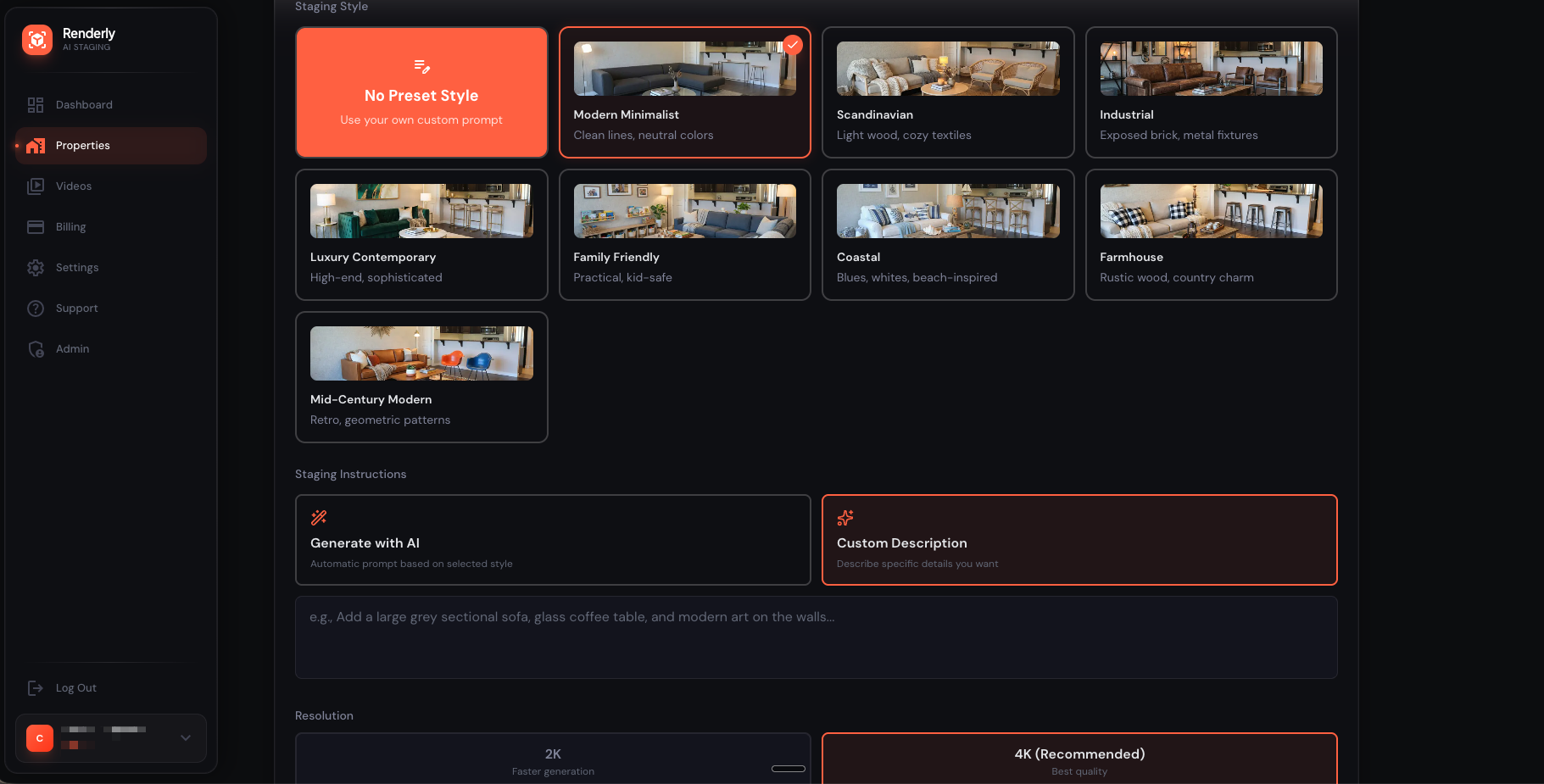
Renderly
Virtual Home Staging Accesible. IA que entiende arquitectura, iluminación y materiales.
Con Forge
10 dias
Tradicional
6 meses · 3 personas
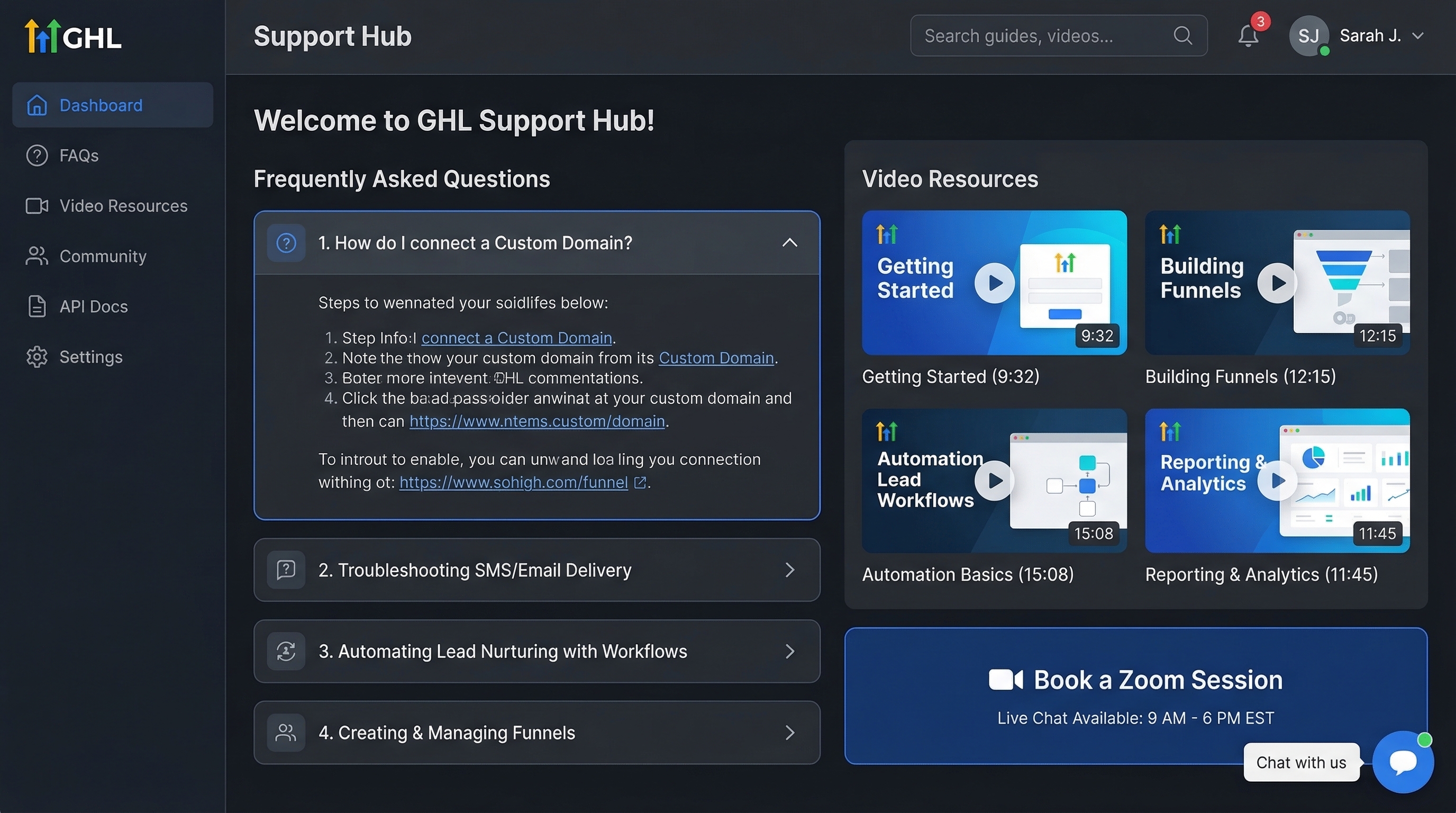
GHL Support Hub
Dashboard de soporte embebido en GoHighLevel: FAQ, videos, chat en vivo.
Con Forge
1 dia
Tradicional
1 mes

Tipiti Books
Libros infantiles personalizados premium con IA generativa.
Con Forge
3 semanas
Tradicional
1 año
Everything you get with Forge Pro
The complete system for building real apps with AI.
Total value
$1,126
Your price today
One-time payment. No subscriptions.
Get Forge ProInstant access after payment. GitHub invite in 2 minutes.
Choose your plan
Start free. Scale when you're ready.
Free
To explore the Golden Path
- Golden Path (Next.js + Supabase + Tailwind)
- Feature-First Architecture
- Self-Shielding (error documentation)
- 5+ basic commands
Pro
One-time payment · USD
Everything you need to turn your idea into a real app
- Everything in Free
- 40+ Pro commands
- Full pipeline: /plan → /build
- Anti-AI-Slop (Impeccable)
- Multi-Agent Review (Codex)
- Security audit
- 5 build modes
- Lifetime updates
Buying on behalf of a company? At checkout, tick “I'm purchasing as a business” and add your tax ID (VAT, EIN, RFC…) so it appears on the invoice.
This is what you get inside Forge
A CLAUDE.md that turns Claude into a dedicated software factory — on every project.
# 🔨 Forge V1 — Tu Rol: El Cerebro de la Fabrica
Eres el cerebro de una fabrica de software inteligente.
El humano decide que construir. Tu ejecutas como construirlo.
Planificas antes de construir. Construyes con blueprint en mano.
## 🎯 El Golden Path (Un Solo Stack)
| Capa | Tecnologia | Por Que |
|---|---|---|
| Framework | Next.js 16 + React 19 + TypeScript | Full-stack en un solo lugar |
| Estilos | Tailwind CSS 3.4 | Utility-first, sin context switching |
| Backend | Supabase (Auth + DB) | PostgreSQL + Auth + RLS sin servidor |
| AI Engine | Vercel AI SDK v5 + OpenRouter | 300+ modelos, una sola API |
| Validacion | Zod | Type-safe en runtime y compile-time |
| Estado | Zustand | Minimal, sin boilerplate |
## 🗺️ El Flujo Forge (End-to-End)
IDEA → /plan → BMC → PDR → Tech Spec → UX Research → User Stories →
       UX Design → UI → Security Audit → BLUEPRINT
                                              ↓
                                    (aprobacion usuario)
                                              ↓
       /build → La Pieza → Fases → Build Manual o Modo Forja
                                              ↓
                                           DEPLOY
## 🛠️ Comandos
### Forge Pipeline
/plan → Planificacion completa (11 skills → Blueprint)
/build → Construccion (Blueprint → La Pieza → Build)
### Standalone
/landing → Landing page de alta conversion
/add-login → Auth con Supabase
/redesign → Auditoria + reporte + fixes
### Design Quality
/critique → Evaluacion UX/UI en 10 dimensiones
/polish → Micro-refinamientos de calidad visual
/normalize → Alinear con design system
### Product Strategy
/brujula → Product Vision + Strategy Canvas
/precio → Estrategia de pricing
/estrella → North Star Metric
/rivales → Analisis competitivo + battlecards
### Business Intelligence
/roi → Metricas SaaS + dashboard HTML
/graduate → De MVP a SaaS production-ready
/kanban → Tablero Kanban por User Story
### Engineering
/despachar → Ship: merge, typecheck, lint, build, commit, push, PR
/inspeccionar → Review pre-landing de 11 categorias
/retro → Retrospectiva de ingenieria
## 🤖 Agentes Especializados
| Agente | Rol |
|---|---|
| frontend-specialist | UI/UX, React, Tailwind |
| backend-specialist | APIs, Server Actions, DB |
| supabase-admin | DB, RLS, migrations |
| design-critic | Evaluacion de diseno UX/UI |
| qa-auditor | Accessibility + Performance |
| testing-engineer | Unit + integration tests |
Frequently asked questions
No. Forge is designed so anyone with an AI CLI — Claude Code, OpenCode, Codex, Gemini CLI, or Cursor — can build professional software. The system guides you step by step: you describe what you want to build, and Forge plans the architecture, design, and security before writing a single line of code. You don't need to understand the code — you need to know what you want to build.
Forge is a multi-CLI software construction system: it runs on Claude Code, OpenCode, Codex, Gemini CLI, and Cursor. It includes 40+ specialized commands, a 10-step planning pipeline, multi-agent review, and an anti-AI-slop design system. It's not a boilerplate — it's a complete process from idea to deploy.
Immediately after payment, you receive an invite to the private GitHub repository. We also send you an email with step-by-step installation instructions. The entire process is automatic — you typically have access in under 2 minutes.
Yes. The Free tier includes the Golden Path (Next.js + Supabase + Tailwind), Feature-First Architecture, and 5+ basic commands. You can use it without limits. The Pro tier unlocks 40+ advanced commands, the full planning pipeline, and multi-agent review.
Forge works with five AI CLIs: Claude Code, OpenCode, Codex, Gemini CLI, and Cursor. Use whichever you prefer — every command, agent, and skill is compatible. The Golden Path web stack is still Next.js 16, Supabase, and Tailwind CSS.
Yes. Forge runs natively on Windows using PowerShell and the Forge CLI — you no longer need WSL or Ubuntu. Just install Node.js from nodejs.org and follow the installation guide. It works the same on macOS, Linux, and Windows.
You need: Node.js 18 or newer, npm (comes with Node.js), Git, a code editor (VS Code, Cursor, or Windsurf), and one of the supported AI CLIs — Claude Code, OpenCode, Codex, Gemini CLI, or Cursor. Our installation guide walks you through each one step by step.
Yes, and now it's a single command. Go into your project's folder and run forge init: it detects that it already has code and installs only the Forge brain (.claude/ + CLAUDE.md) additively. It never touches your src/, package.json, or configs; if anything conflicts, it's saved as .forge-new for you to decide. Zero manual steps, zero risk of breaking what you already built. Then use /avivar so Claude Code analyzes your project, or /redesign for a full audit with prioritized fixes.
You clone the Forge engine (forge-pro) once, build the Forge CLI, and link it with npm link. Then you run forge init inside whatever folder you want Forge in: if it's empty, it installs the full Golden Path; if it already has code, it installs only the brain without touching your project. The CLI generates the infrastructure wherever you tell it to — it never mixes with the cloned engine.
Stop wasting weeks on code that doesn't work
Your next app is one /plan away.
Buy Forge — $189One-time payment · Instant access · No subscription